Version 2.7.2
What's new in Intake 2.7.2
On iOS, entries, products and recipes get photos: at the top of their page, as a small picture on Today and on your other devices through iCloud. Plus a report you can read, with a Markdown export for a chat with an AI, portions down to 0.01 g for tablets, nutrients per portion and six fixes. On Android come the same photos, backed up encrypted in your Google Drive, the same report, tablets and nutrients per portion, and nine fixes
New on iOS: photos of your food
Every entry, every product of your own and every recipe can now have a photo. Tap the square with the photo symbol next to the name and take a photo or choose one from your library. Choosing needs no access to your photo library: the system’s picker hands over only the one photo.
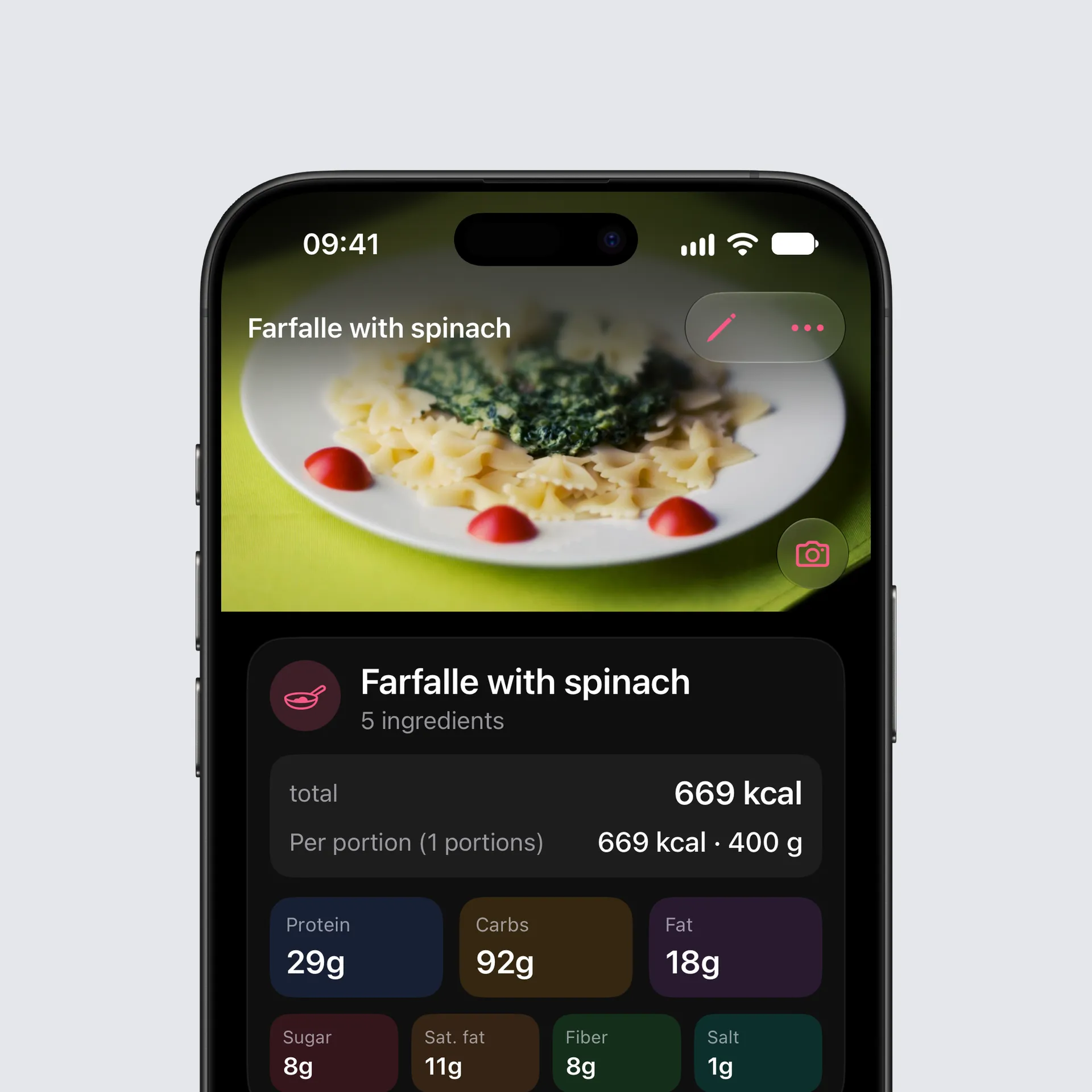
At the top of the page. Open a food with a photo and the photo spans the top of the page, with the toolbar floating over it. Pull the page down and the photo grows; a tap shows it full screen. The camera button at its bottom right changes or removes it.
On Today. Entries with a photo show it as a small picture at the start of the row. An entry shows its own photo, otherwise the photo of the product or recipe it came from, so one photo on a product covers every future entry.
Meal Scan. The photo Intake AI estimated a meal from now stays with the entry for good. Log the same meal again later from Frequent or a suggestion and the photo comes along. Copy a meal to another day and its entries take their photos with them.
Recipes. Recipes show their photo in the list and at the top of the recipe. Share a recipe as a file and the photo travels with it; whoever opens it gets the photo too.
Sharing. “Share picture” starts with the food’s photo when there is one.
On every device. With iCloud sync, photos reach your other devices, each as its own record in your private iCloud. In Settings, iCloud Sync, you can switch photo sync off per device. Photos only go to your iCloud, never to a server of Intake.
Settings. In Settings, Appearance, Photos you can switch photos off entirely, show them only when you open a food, or show them on the ingredients of an estimate logged one by one. Photos that are switched off stay stored.
New on Android: photos of your food
On Android, too, entries, products of your own and recipes can now have a photo: at the top of the page, as a small picture on Today, with Meal Scan, when you copy a meal, in shared recipes and in “Share picture”, just as described above. Choosing a photo uses Android’s photo picker, with no storage permission. Settings, Appearance, Photos has the same three switches as on iOS.
In your Google Drive backup. Instead of iCloud, your photos reach another device through your Google Drive backup. They are encrypted with your backup passphrase before they leave your device and are stored only in your own Google Drive. After a restore they download in the background. In Settings, Backup, switch “Back up photos” off if you only want your data backed up.
Important with several devices. If you use the same Google account on more than one Android device, update all of them to 2.7.2 before you rely on photo backup. Older versions don’t know about the photos in the backup and clear them away.
A report you can read
The PDF export is now in portrait, with every entry of every day, macros for each entry and the totals up front. A long meal continues on the next page with its heading, long names appear in full, and every number follows your language’s format. For a chat with ChatGPT, Claude or another AI, the same report comes as Markdown. Android has it too, in Settings, “Export PDF report”, “For AI (Markdown)”.
Tablets and nutrients per portion
Portions go down to 0.01 g, so a tablet or a capsule gets its real weight. When you create a product you can now enter the values per portion, per tablet or per bar, just as they are printed on the pack. Intake works out the rest. Both work on iOS and Android.
Bug fixes
iOS
- The week strip shows the right dates. After swiping to another week, one cell briefly flashed the old date. The new week’s dates are there straight away now.
- A new day at midnight. Keep Intake open past midnight or come back the next morning, and Today moves on to the new day. If you are looking at an older day, you stay there.
- Quick entries in grams. A quick entry can be changed to grams, and it stays in grams when you switch the drink option off.
- The right meal from shortcuts. The Lock Screen, widgets and Siri log into the meal that fits the time of day. On the product page you can pick another one.
- Your edits in Frequent. Edit a product from Frequent and the list shows your values. Entries you already logged stay as they are.
- Your meals on every device. Meals you added yourself stay on all your devices.
Android
- A new day, also after a night’s sleep. Come back the next morning and Today shows the new day straight away, not only after a minute. Rotating the device or switching to dark mode no longer sends you from an older day back to today, and widgets move on to the new day at midnight.
- The widget logs for today. Quick logging from the widget always lands on today.
- Quick entries stay as they are. Saving an unchanged quick entry no longer turns it into 1 g, and the drink option leaves the amount unchanged.
- Your edits in Favourites and Frequent. Edit a product of your own and Favourites, Recent and Frequent show your new values. Entries you already logged stay as they are.
- Targets by day. The “Apply as” choice is readable again, and a one-off adjustment reaches Today without you having to switch targets by day on first.
- Small nutrient amounts. A value like 0.04 for an extra nutrient no longer turns into 0 when you open it again.
- Products with 0 kcal. Water or a vitamin tablet can be saved as a product of your own, also without submitting it for review.
- Vitamins in suggestions. A suggestion shows vitamins and minerals in the right amount. With small portions such as a tablet, the values shown used to be far too small.
- A confirmation from every list. Log a recipe or a food from Recipes, Favourites or Frequent and you now see the confirmation.
As always, you can find the complete changelog here.
Thank you for using Intake.
Tobi