

Describe a meal in a sentence
Type what you ate and Intake AI estimates calories, protein, carbs, and fat.
Optional add-on
Available nowDescribe a meal, take a photo, or scan a label. Intake AI turns it into editable calories and macros so logging is faster when you want the help.
The core app stays a one-time purchase and keeps working without AI.
Intake AI
Intake AI works like a small chat built for food logging. It estimates, explains uncertainty, and lets you correct the result before anything is saved.
Type what you ate and Intake AI estimates calories, protein, carbs, and fat.
Use the camera or library for plates, snacks, and restaurant meals.
Prefill calories and macros from packaged-food labels before reviewing them.
If the estimate is off, tell Intake AI what changed and review the updated suggestion.
Pricing
Intake AI is paid because model calls cost money. Using your own API key (BYOK) is free of Intake AI subscription charges.
Use Intake AI with food-specific prompts, richer logging controls, and automatic improvements.
3.99 € per month
3 days free trial
39.99 € per year
3 days free trial
Add your own OpenAI, Claude, or Gemini API key in Settings and use basic AI food logging without an Intake AI subscription.
Provider terms and any provider-side usage costs still apply.
Set up BYOKFeature comparison
Own API key (BYOK) is the basic free AI logging chat with your provider key. Intake AI adds the richer food-logging workflow and is improved continuously.
| Feature | Intake AI | Own API key (BYOK) |
|---|---|---|
| Text chat and meal photos | Describe meals or send photos, then review editable suggestions before logging. | Send text or images to the supported AI provider of your choice with your own API key (BYOK). |
| Recognized ingredient handling | Log the result as one meal, or show ingredients separately and log them separately. | The provider returns a single product or meal item containing the ingredients it recognized. |
| Estimate corrections before logging | Correct estimates in place, choose larger or smaller portions, remove, edit, or add ingredients and amounts, and manually adjust the calories of an estimate before logging. | Basic single-item estimate from your chosen provider. Corrections only work by sending a chat message to the provider. |
| Nutrition-label product creation | Scan a nutrition label while creating a new product and Intake AI fills out the create-product form with values from the photo. | Not available |
| Ongoing feature work | Continuously improved as Intake AI evolves. | Basic AI food logging chat with your own API key (BYOK) and your provider's terms and costs. |
Only Intake AI lets you review recognized ingredients separately, adjust amounts, and correct estimates before saving them.
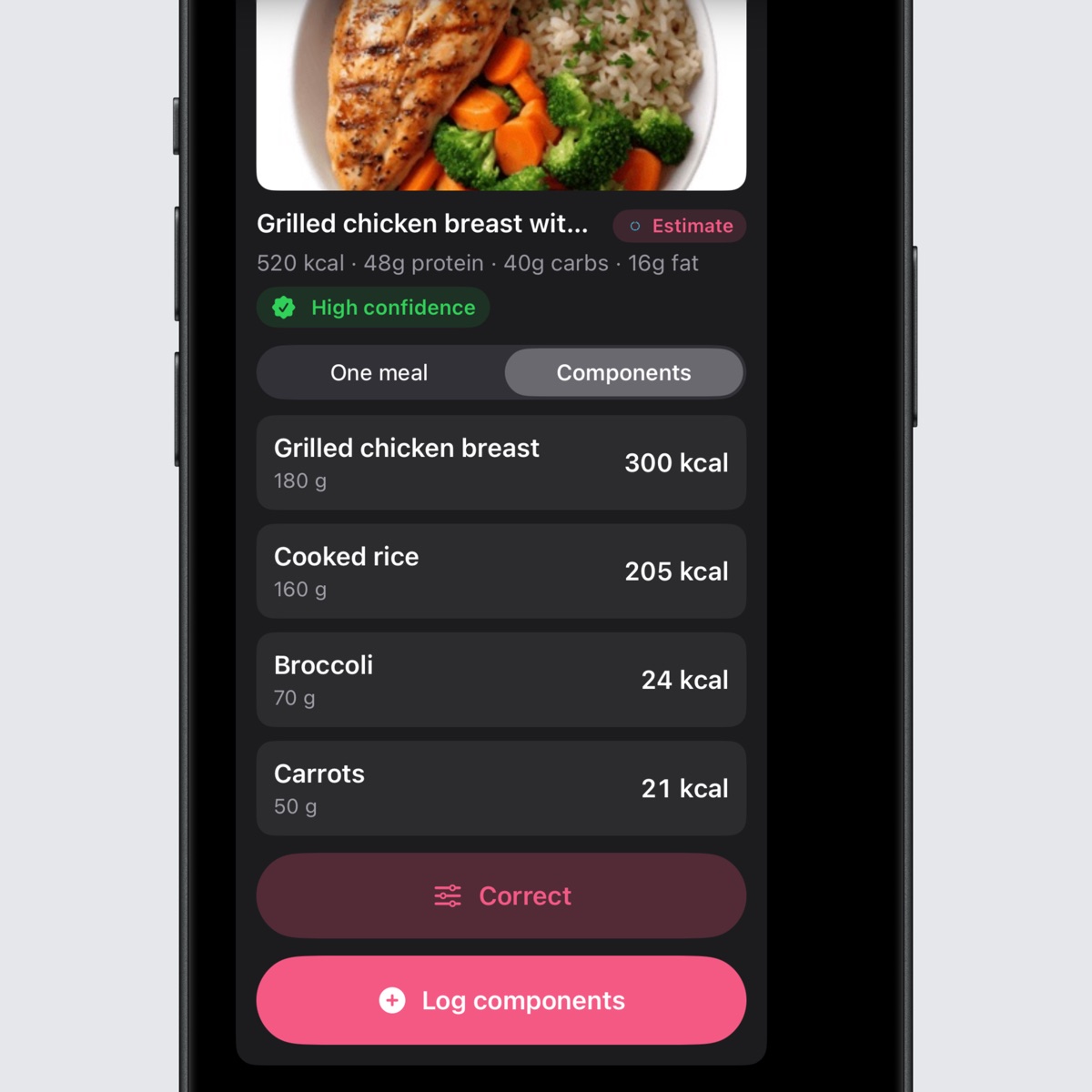
Switch from one meal to components, review each recognized ingredient, and log them separately.
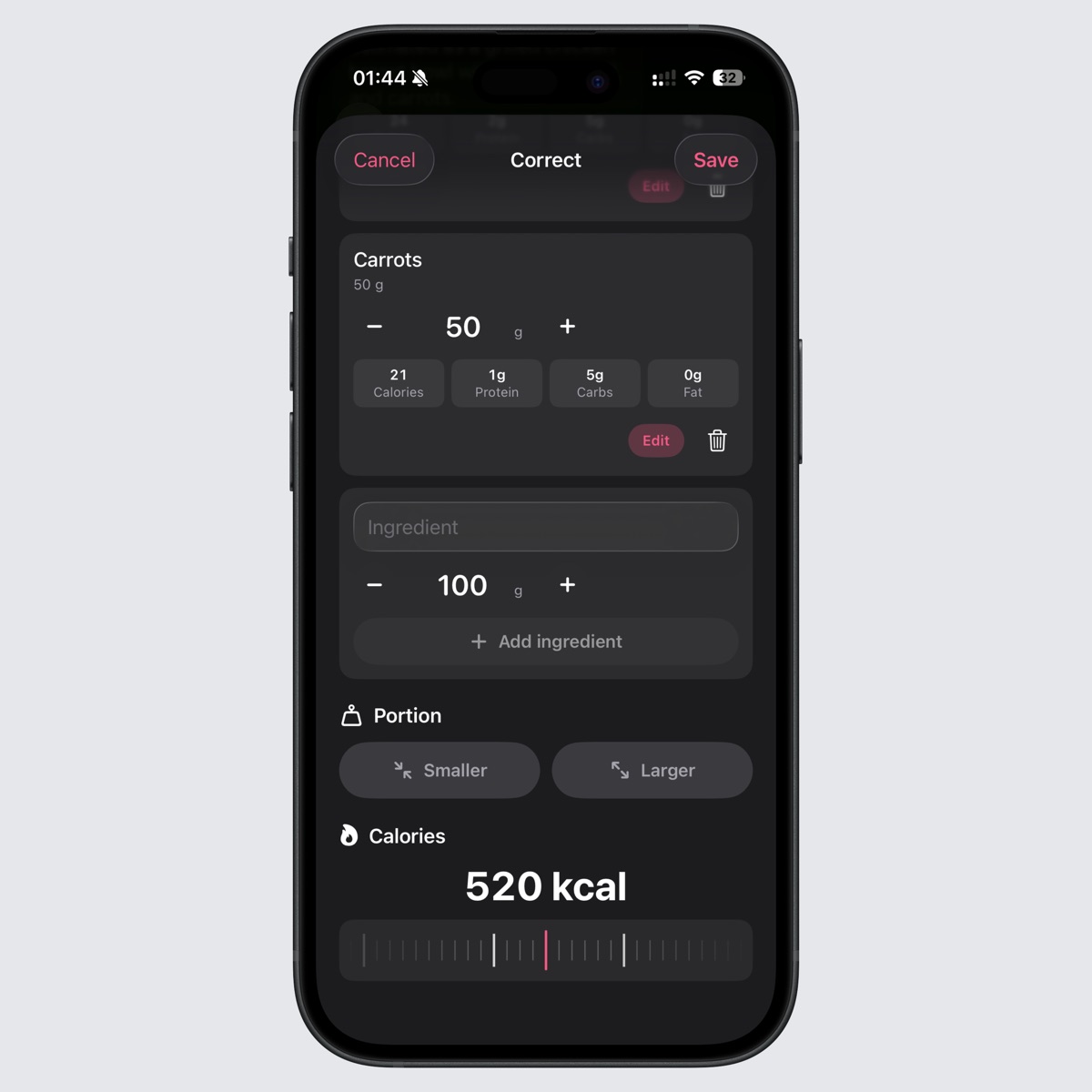
Edit ingredients, change amounts, pick smaller or larger portions, and adjust calories before logging.
AI results are estimates and can be wrong. Intake AI creates editable suggestions; you decide what gets saved to your diary.
Intake AI analysis sends food descriptions, photos, captions, and recent chat context through Intake's backend and AI providers to generate nutrition estimates.
No monthly fee. No login wall. No nutrition data leaving your device unless you choose it.